Assistive technology
Run a Keyboard-Only End-to-End Test
Published by whatisADA / Grow Wild Agency · Updated
Purpose and preparation
Review one complete process without a mouse, from entry to confirmation. Keep a visible focus indicator and use the expected keys for each control type. Record each unreachable action or unexpected focus movement as a separate observation.
A practical example
On our own heading validator, use the skip link, load malformed input, run validation, return to the input, correct it and run the check again. The completed keyboard record below shows the keys, focus targets and observed results.
How to check it
- Reload the starting page and use Tab and Shift+Tab to inspect focus order. Try the skip link and check whether focus is visible near sticky headers.
- Operate menus, radios, selects and dialogs using their appropriate keys. Check that every task action is reachable and that no component traps focus unintentionally.
- Trigger validation, move between steps and cancel or finish the process. Record where focus goes after each large content change.
Completed example: keyboard error recovery in our heading validator
Tested October 19, 2026 · Grow Wild’s maintenance work on What Is ADA
A keyboard review needs a finish line. For this session, ours was to load an unsupported heading, see the error, correct the input and reach a new result using only keyboard input. We ran the journey on the heading validator we maintain, after repairing its input parser. This is a completed check of our own tool, using synthetic text.
The parser tests already established which lines the tool recognizes. This session asked a different question: could a visitor operate the task and recover from an error without a mouse? No new tool repair was needed for the recorded journey.
Test boundary and environment
We tested the deployed tool at revision dfa5ba7, in the Codex in-app browser on macOS 27.0 (build 26A428), at a 1280 × 720 viewport. Browser-level key events and text entry operated the page; focus inspection and screenshots recorded the result. The browser engine/version was not recorded, so this is a limited environment sample rather than a browser-compatibility claim.
No screen reader was running. This session did not test speech output, mobile touch navigation, every site menu, a client website or a participant’s experience of disability. The recorded outcome is “observed as expected in this session.”
The keys, focus targets and outcomes we recorded
Start from a fresh load. Use the control labels as checkpoints; the exact number of Tab presses can change as a page evolves. The skip link became visible when focused. After activation, the next Tab reached the main-content breadcrumb.
Enter the task
Tab to the skip link, Enter, then Tab.
Observed: Focus reaches the Home breadcrumb inside the main content, bypassing the repeated site navigation.
Load a difficult input
Tab through the Tools breadcrumb and example buttons; Enter on “Load: Mismatched HTML tags.”
Observed: The input becomes <h2>Products</h3>. The example button remains the keyboard starting point.
Run the check
Tab to the textarea, then Tab to Validate Headings; press Enter.
Observed: The result reports 0 recognized headings and 1 unrecognized line. Focus moves to “Heading review results.”
Recover from the error
Shift+Tab to Validate Headings, then Shift+Tab to the textarea. Select all and type the supported outline below.
Observed: The input can be corrected without a pointer. Editing clears the previous result.
Complete the corrected task
Tab to Validate Headings and press Space.
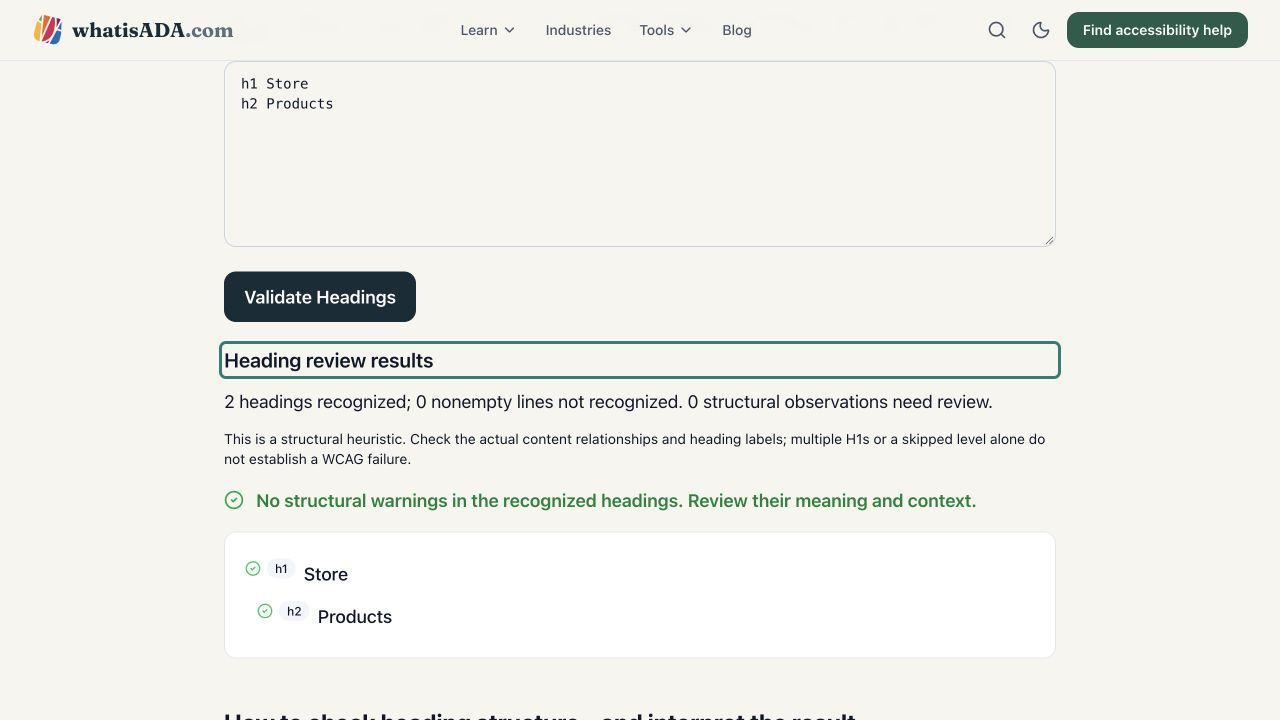
Observed: The result reports 2 recognized headings, 0 unrecognized lines and 0 structural observations. Focus returns to the results heading.
Continue past the result
Press Tab from the results heading.
Observed: Focus reaches the JSON examples download link. We verified reachability here, not activation of the download.
For the correction, select the input text with Command+A on the tested Mac and enter these two lines:
h1 Store
h2 Products
Both result states placed focus on the results heading with a visible outline. The heading was visible below the fixed navigation. Moving backwards returned to the action button and then the input; moving forwards reached the next link. We observed no keyboard trap along this recorded route.
Download the completed record
Keyboard journey and untested screen-reader item (CSV)
Detailed keyboard trace and observed focus targets (JSON)
Keep these as examples of our tested scope. For your own page, record the task, environment, starting state, keys, expected destination, actual focus, result and follow-up. Use the worksheet below or the blank evidence template.
How to interpret the result against WCAG
2.1.1 Keyboard concerns keyboard operation of functionality. 2.1.2 No Keyboard Trap concerns being able to leave a component through the keyboard. Reaching one button answers neither question for every action on a page.
2.4.3 Focus Order concerns a sequence that preserves meaning and operation. 2.4.7 Focus Visible concerns a visible focus indicator. Our screenshots and focus trace support observations about this route; they do not constitute a complete evaluation of these criteria.
Screen-reader follow-up: the completed NVDA session
We have since repeated this task with real NVDA on Windows. The completed NVDA session and speech record documents the spoken control names, error details, corrected result and return path. This original keyboard record remains a separate session without assistive technology; its downloadable “not tested” item describes that earlier scope.
For a different environment, use the appropriate VoiceOver and Safari workflow or NVDA workflow. Technical checks and usability sessions with disabled participants answer different questions; do not label one as the other. Plan those sessions around the real audience and task before reporting their outcomes.
What can be missed
Tab is not the expected navigation key inside every composite widget. A test should distinguish a missing interaction from an unfamiliar but documented keyboard pattern.
Record your test
Use this worksheet to record what you actually checked. Notes stay on this device when you choose Save; they are not sent to us. Avoid personal or confidential information on shared devices.
These are your observations, not automated results or a conformance certificate. A complete evaluation needs appropriate scope, supported technologies, all applicable criteria and relevant page states.
Primary sources and scope
- Primary workflow guidance
- WCAG 2.1.2: No Keyboard Trap
- WCAG 2.4.3: Focus Order
- WCAG 2.4.7: Focus Visible
This is independent implementation guidance with original examples. The linked standard contains the full definitions, exceptions and conformance requirements. A criterion or checklist alone does not establish legal applicability or whole-site conformance.